Ethernet Wired Pairing
1. Overview
This document describes how to use the Device Pairing SDK (with UI) and Device Pairing SDK (without UI) for Ethernet wired network pairing.
2. Prerequisites
- Complete preparation
- Complete environment build
- Complete Device Pairing SDK (with UI) or Device Pairing SDK (without UI) integration
3. Usage
3.1 Pairing flow
Ethernet wired pairing means the device joins the network (router) through a wired connection. Users do not need to enter an account/password during pairing. The pairing information is sent directly to the device, and activation operations such as registration and binding are completed.
3.2 Device Pairing SDK (with UI)
3.2.1 Navigate to the pairing page for a specific device
Kotlin
LumiAccessSDKManager.getInstance().gotoAccessConfigModule(
    this,
    "lumi.gateway.agl008", // deviceModel; see the supported device list
    object : LumiResultCallBack {
        override fun fail(errorCode: Int?, errorMessage: String?) {
            // Pairing failed
        }

        override fun success(activity: WeakReference<Activity>, message: String?) {
            // Pairing succeeded. You can close the pairing page at an appropriate time:
            activity.get()?.finish()
        }
    }
)
Java
LumiAccessSDKManager.getInstance().gotoAccessConfigModule(
        this,
        "lumi.gateway.agl008",
        new LumiResultCallBack() {
            @Override
            public void fail(@Nullable Integer errorCode, @Nullable String errorMessage) {
                // Pairing failed
            }

            @Override
            public void success(@NonNull WeakReference<Activity> activity, @Nullable String message) {
                // Pairing succeeded. You can close the pairing page at an appropriate time:
                Activity page = activity.get();
                if (page != null) {
                    page.finish();
                }
            }
        }
);
Parameter description
| Field | Data type | Description | How to obtain |
|---|---|---|---|
| deviceModel | String | Device model value | See Device Pairing SDK Supported Device List |
3.3 Device Pairing SDK (without UI)
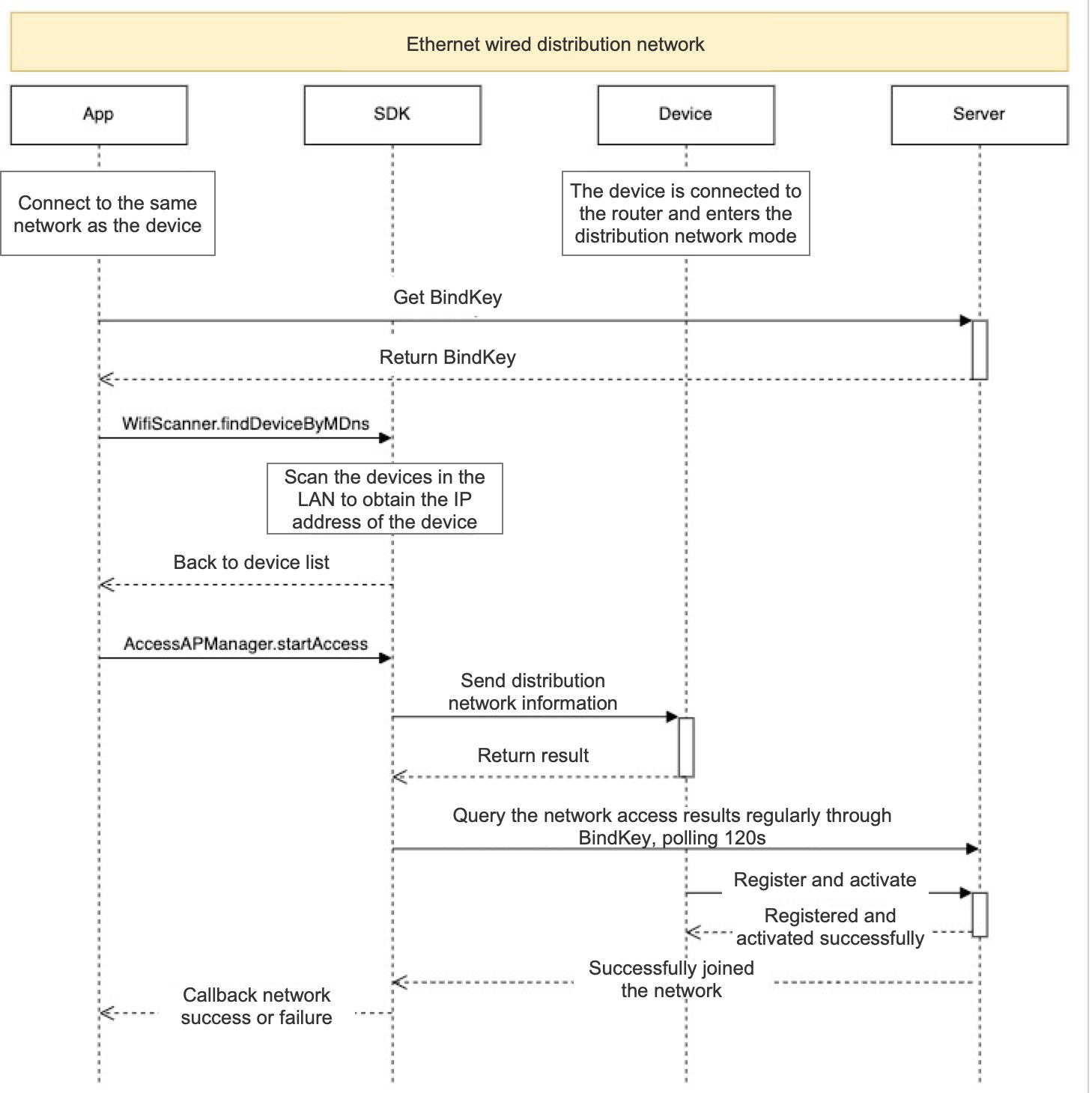
3.3.1 Obtain BindKey
The third-party app must request the cloud API itself. For details, see API documentation
3.3.2 Discover devices
WifiScanner wifiScanner = new WifiScanner(this);
wifiScanner.findDeviceByMDns(2000L)
        .onTerminateDetach()
        .as(AutoDispose.autoDisposable(AndroidLifecycleScopeProvider.from(this)))
        .subscribe(new Consumer<List<LANDeviceEntity>>() {
            @Override
            public void accept(List<LANDeviceEntity> lanDeviceEntities) throws Exception {

            }
        }, new Consumer<Throwable>() {
            @Override
            public void accept(Throwable throwable) throws Exception {

            }
        });
Parameter description
| Field | Data type | Description | Notes |
|---|---|---|---|
| intervalTime | long | Interval | How often (in milliseconds) the SDK callbacks with results |
3.3.3 Send pairing information
AccessConfigBean accessConfigBean = new AccessConfigBean(
        "coapServer",
        "bindKey"
);

AccessAPManager manager = new AccessAPManager.WifiAccessBuilder()
        .setAccessInfo(accessConfigBean)
        .setDeviceIp("Device IP address")
        .setAccessMode(AccessAPManager.WifiAccessMode.ACCESS_MODE_TETHERNET)
        .setAccessListener(new IAccessListener() {
            @Override
            public void connectSuccess() {

            }

            @Override
            public void accessResult(@Nullable String s) {

            }

            @Override
            public void accessFail(int i, @Nullable String s) {

            }
        })
        .build(this);

// Start pairing
manager.startAccess();

// Recycle resources at an appropriate time; otherwise pairing data may be cached and cause failures
manager.onDestroy();
Parameter description
| Field | Data type | Description | How to obtain |
|---|---|---|---|
| ssid | String | Pairing Wi-Fi name | Obtained from Wi-Fi scan |
| password | String | Pairing Wi-Fi password | Entered by the user |
| coapServer | String | Device onboarding server | Obtained via API; see Aqara Developer Platform |
| bindKey | String | Unique device onboarding identifier | The third-party app requests the API itself |
| deviceIp | String | Device IP address | Obtained via mDNS search |
| accessMode | String | Device onboarding type | See values below |
accessMode values
| Value | Data type | Description |
|---|---|---|
| ACCESS_MODE_TETHERNET | enum | Pair via Ethernet; see appendix Supported onboarding device list |