Environment Build
1. Overview
This document describes the project configuration required before integrating the Aqara SDK, and how to obtain the parameters needed for SDK initialization. You can refer to the sample project aqara_sdk_sample while integrating.
2. Prerequisites
- Make sure you have completed Preparation
- Make sure you have installed Android Studio and configured JDK, Android SDK, and other development environments. For details, see the Android Developers website
3. Add Dependencies
3.1 Build environment requirements
| Parameter | Version | Description |
|---|---|---|
| minSdkVersion | 26 | Android 8.0 |
| targetSdkVersion | 36 | Android 16 |
| compileSdk | 36 | Android 16 |
| Java | 17 | / |
| NDK | 27.0.12077973 | / |
| Kotlin | 2.1.0 | / |
| KSP | 2.1.0 | / |
| Android Gradle Plugin | 9.1.0+ | Minimum 8.9+ |
| Gradle | 9.3.1+ | Minimum 8.9+ |
3.2 Open Android Studio
3.3 Edit settings.gradle in the project root
pluginManagement {
    repositories {
        gradlePluginPortal()
        google()
        mavenCentral()
        maven { url 'https://jitpack.io' }
        // Aqara Maven repository
        maven {
            url 'https://public-maven.aqara.com/repository/lumi-release/'
            credentials {
                username = 'maven_username'
                password = 'maven_password'
            }
        }
    }
}

dependencyResolutionManagement {
    repositoriesMode.set(RepositoriesMode.FAIL_ON_PROJECT_REPOS)
    repositories {
        google()
        mavenCentral()
        maven { url 'https://jitpack.io' }
        // Aqara Maven repository
        maven {
            url 'https://public-maven.aqara.com/repository/lumi-release/'
            credentials {
                username = 'maven_username'
                password = 'maven_password'
            }
        }
    }
}
Obtain
maven_usernameandmaven_passwordfrom the sample project or by contacting business support.
3.4 Edit build.gradle in the project root
buildscript {
    dependencies {
        // Aqara SDK unified initialization plugin (use 3.0.0 for Gradle 8.x+)
        classpath 'com.lumi.plugin:module-init:3.0.0'
    }
}

plugins {
    id 'com.android.application' version '9.1.0' apply false
}
3.5 Edit build.gradle in the app module
plugins {
    id 'com.android.application'
}

// Aqara unified initialization plugin
apply plugin: 'lumi-module-init'

android {
    namespace 'com.your.package.name'
    compileSdk 36

    defaultConfig {
        applicationId "com.your.package.name"
        minSdk 26
        targetSdk 36
    }

    compileOptions {
        sourceCompatibility JavaVersion.VERSION_17
        targetCompatibility JavaVersion.VERSION_17
    }

    // Resolve .so / resource conflicts (recommended when integrating multiple business SDKs)
    packagingOptions {
        jniLibs {
            pickFirsts += ['lib/arm64-v8a/libc++_shared.so', 'lib/armeabi-v7a/libc++_shared.so']
        }
        resources {
            excludes += ['META-INF/DEPENDENCIES', 'META-INF/com.github.CymChad.brvah.kotlin_module',
                         'META-INF/gradle/incremental.annotation.processors']
        }
    }
}

// If you also integrate scan and IR modules, zxing conflicts may occur; exclude as needed
configurations.configureEach {
    exclude group: 'com.google.zxing', module: 'core'
}

dependencies {
    // Core SDK (required). Use the latest version; see [The Latest Version of the SDK](./ThelatestversionoftheSDK.md)
    implementation 'com.lumi.external:core:2.2.62'
    implementation 'com.lumi.commonui:ui:1.5.33'
}
3.6 AndroidX support
Add AndroidX support in gradle.properties:
android.useAndroidX=true
android.enableJetifier=true
3.7 Permission declaration
The Core SDK and most business capabilities depend on network permissions. Declare them in the host app AndroidManifest.xml (some permissions may also be merged automatically from the SDK AAR):
<uses-permission android:name="android.permission.INTERNET" />
<uses-permission android:name="android.permission.ACCESS_NETWORK_STATE" />
<uses-permission android:name="android.permission.ACCESS_WIFI_STATE" />
Bluetooth, location, microphone, storage, and other permissions are used by specific business SDKs (device pairing / camera / door lock, etc.) as needed. See the corresponding business docs to declare them, and request dangerous permissions at runtime.
4. Initialization
4.1 Obtain the necessary parameters for SDK initialization
4.1.1 Obtain AppId and AppKey
See Preparation
4.1.2 Obtain other required parameters
The way to obtain these parameters differs by account authorization mode. For details, see Authorization Management
In most cases, virtual account authorization is used: the third-party app requests its own cloud platform to obtain the related parameters:
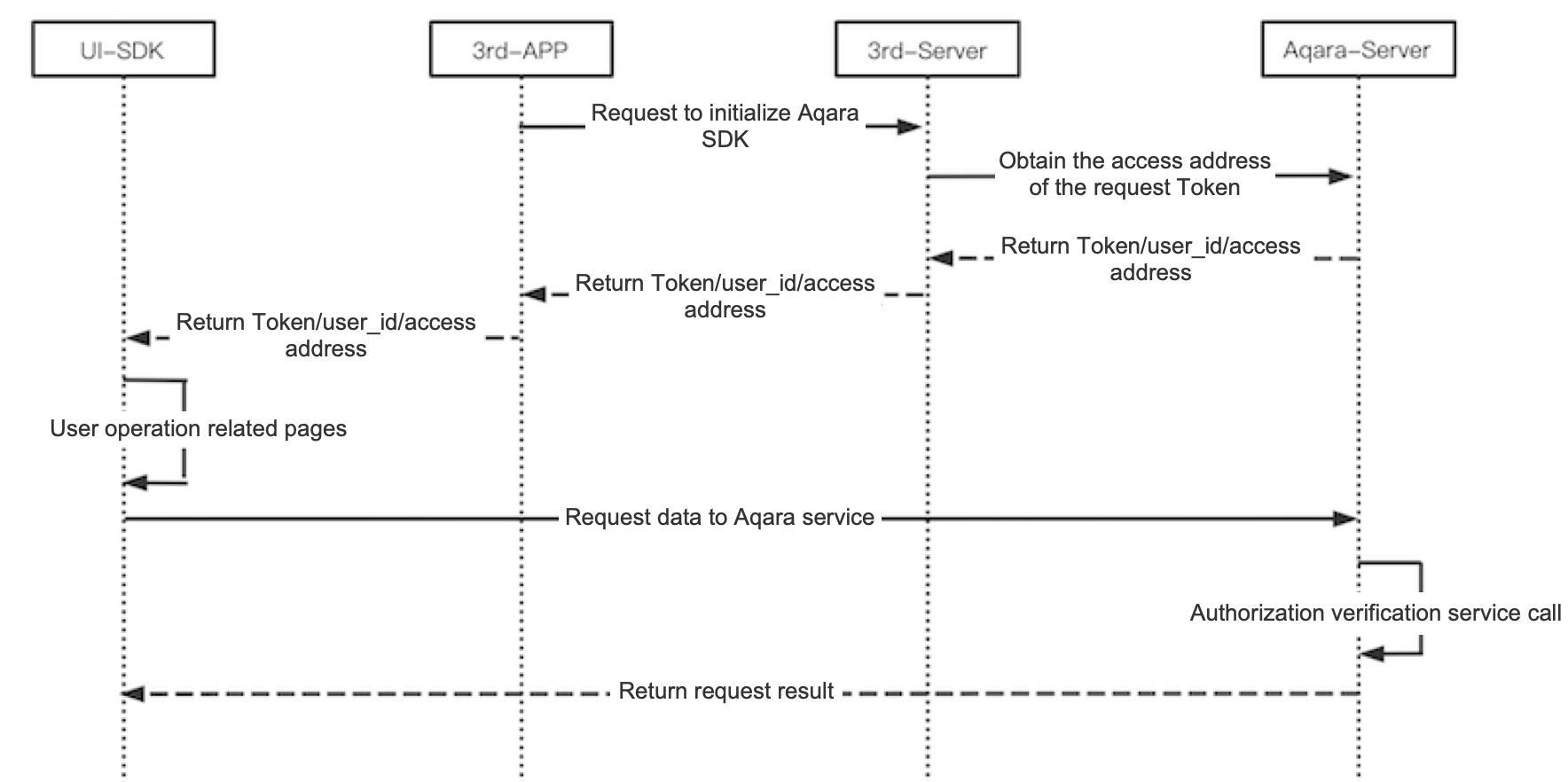
4.2 SDK initialization
When integrating Aqara Android business SDKs, you usually only need unified initialization through LumiCoreManager. Other business SDKs usually do not need separate initialization.
4.2.1 Perform unified initialization
Initialization API call
val extension = HashMap<String, Any>()
extension[LumiReactNativeManager.LumiReactNativeConfig.KEY_BUNDLE_LOAD_TYPE] = RNBundleLoadType.PREFAB_ASSETS
extension[LumiReactNativeManager.LumiReactNativeConfig.KEY_BUNDLE_CONFIG_LOAD_TYPE] = RNBundleConfigLoadType.PREFAB_ASSETS

LumiCoreManager.getInstance().init(
    application,
    true, // true: enable debug logs; false: disable
    LumiCoreManager.LumiCoreSDKConfig.builder()
        .baseUrl("host")
        .baseH5Url("h5Url")
        .baseImageUrl("imageUrl")
        .appId("appId")
        .appKey("appKey")
        .clientId("clientId")
        .sdkChannel("sdkChannel")
        .userInfo(object : ILumiUserInfo {
            override fun getUserId(): String? = "userId"
            override fun getUserToken(): String? = "userToken"
            override fun getArea(): String = "area"
            override fun getLanguage(): String = "language"
            override fun getSupportDeviceArea(): String = "supportDeviceArea"
            override fun getCountry(): String = "country"
            override fun getCoapServer(): String = "coapServer"
        })
        .positionInfo(object : ILumiPositionInfo {
            override fun getHomeId(): String? = "positionId"
        })
        .extensions(extension)
        .build()
)
Parameter description
| Field | Data type | Description | How to obtain |
|---|---|---|---|
| appId | String | Unique App ID | Aqara Developer Platform |
| appKey | String | App secret | Aqara Developer Platform |
| clientId | String | Unique App push ID | Obtained via API; see Aqara Developer Platform |
| baseUrl | String | Domain used by SDK requests | Obtained via API; see Aqara Developer Platform |
| baseH5Url | String | H5 URL used by SDK requests | Obtained via API; see Aqara Developer Platform |
| baseImageUrl | String | Image CDN URL used by SDK requests | Obtained via API; see Aqara Developer Platform |
| sdkChannel | String | Channel identifier | Project identifier that affects some business logic; fill in the project name |
| userId | String | Unique user ID | Obtained via API; see Aqara Developer Platform |
| userToken | String | User access token | Obtained via API; see Aqara Developer Platform |
| area | String | App region | Default: CN; see Region Comparison Table |
| language | String | Current App language | Default: zh; see Region Comparison Table |
| supportDeviceArea | String | Device onboarding region | Default: CHN; see Region Comparison Table |
| country | String | Actual country/region of the user / device | See Region Comparison Table |
| coapServer | String | Device onboarding CoAP server address | See Region Comparison Table |
| positionId / homeId | String | Current position / home ID | Obtained via API; pass through positionInfo |
| extensions | Map | Extension configuration | Pass as needed by business |
Note: Some region codes differ between
areaandsupportDeviceArea;coapServermust match the region of the current cloud domain.
language values
The language parameter affects the multilingual type returned by the SDK and the cloud.
| Value | Description | Notes |
|---|---|---|
| zh | Simplified Chinese | Default |
| zh_TW | Traditional Chinese (Taiwan) | / |
| zh_HK | Traditional Chinese (Hong Kong) | / |
| en | English | / |
| ko | Korean | / |
| ru | Russian | / |
| de | German | / |
| it | Italian | / |
| fr | French | / |
| es | Spanish | / |
Note: This value only affects dynamically obtained multilingual content, such as cloud APIs and configuration files. Multilingual strings used by the SDK itself (in
strings.xml) follow the host app language.
area values
The area parameter affects cloud API business logic. Some services may be unavailable in certain regions.
| Value | Description | Notes |
|---|---|---|
| CN | Chinese mainland | Default |
| HMT | Hong Kong, Macao, and Taiwan of China | / |
| US | United States | / |
| EU | Europe | / |
| RU | Russia | / |
| SEA | Southeast Asia | / |
| KR | Korea | / |
| JP | Japan | / |
| AU | Australia | / |
| ME | Middle East | / |
| AF | Africa | / |
| OTHER | Other regions | / |
supportDeviceArea values
The supportDeviceArea parameter affects device onboarding configuration. Some devices can only be activated and used in specific regions; fill in according to the actual situation.
| Value | Description | Notes |
|---|---|---|
| CHN | Chinese mainland | Default |
| HMT | Hong Kong, Macao, and Taiwan of China | / |
| USA | United States | / |
| EU | Europe | / |
| RUS | Russia | / |
| SEA | Southeast Asia | / |
| KR | Korea | / |
| JP | Japan | / |
| AU | Australia | / |
| ME | Middle East | / |
| AF | Africa | / |
| OTHER | Other regions | / |
country values
The country parameter identifies the actual country/region of the user / device. It affects device SN management and onboarding validation; fill in the real region.
For values, see Region Comparison Table.
After selecting
country, also set the matchingarea,supportDeviceArea, andcoapServer. All three must correspond to the same service region.
4.2.2 Update user information
If you need to switch users, or the token has expired, request the API again to obtain new credentials. See Aqara Developer Platform, then update the SDK user information.
Update user information API call
LumiCoreManager.getInstance()
    .updateUserConfig(object : ILumiUserInfo {
        override fun getUserId(): String? = "userId"
        override fun getUserToken(): String? = "userToken"
        override fun getArea(): String = "area"
        override fun getLanguage(): String = "lang"
        override fun getSupportDeviceArea(): String = "supportDeviceArea"
        override fun getCountry(): String = "country"
        override fun getCoapServer(): String = "coapServer"
    })
4.3 Unified RxJava error handling
The SDK uses RxJava extensively. It is recommended to handle uncaught errors in Application to avoid crashes caused by individual exceptions:
override fun onCreate() {
    super.onCreate()
    RxJavaPlugins.setErrorHandler {
        it.printStackTrace()
    }
}
5. Push
The SDK itself cannot receive cloud push messages and depends on the host app push capability. For details, see Message Push
5.1 Subscribe to push
LumiCoreManager.getInstance().rePushClientId("clientId")
Parameter description
| Field | Data type | Description | How to obtain | Example |
|---|---|---|---|---|
| clientId | String | Unique App push ID | Obtained via API; see Aqara Developer Platform | HOST + random string (within 64 characters; recommended to concatenate HOST with the token obtained during SDK initialization) |
5.2 Forward push
When the third-party app receives a push about an Aqara device, it can forward it to the SDK:
LumiCorePushManager.getInstance().onMessage("content")
Do not pass the entire message body to the SDK. The SDK only needs the string that starts with
LUMI@.
Parameter description
| Field | Data type | Description | How to obtain |
|---|---|---|---|
| content | String | Push message | Obtained by the App itself |
5.3 Push message format
Pass content to the SDK:
{
  "sequenceNo": "202106031107",
  "osType": "android",
  "content": "LUMI@eyJ0eXBlIjoicmVzX3N1YnNjcmliZSIsInJlc3VsdCI6eyJ0aW1lU3RhbXAiOjE2MjMwNjUwNjA5NzYsImF0dHJDaGFubmVsIjoxLCJzb3VyY2UiOiI0LCwxNjIzMDY1MDYwNzgxLDlmMzgyMTIwNjczMTI0ZDI5N2VmNjI0MV9lOTE3ZjE0MDBhNTIyNDk1LjU0NTU4MTgyNTk4MDg5MTEzNywsIiwiYXR0ciI6IjE0LjcuODUiLCJ2YWx1ZSI6IjEyOTE4MTExNTIiLCJzdWJqZWN0SWQiOiJsdW1pMS41NGVmNDRjOTExNjUiLCJpZGVudGlmeUlkIjoiSE9TVDA0YTZkYzAzNzMyNTM3NTBiMzIyMzMxOGVhMGQ1ZmVhMjk0YSIsInB1c2hUeXBlIjoicmVzX3N1YnNjcmliZSJ9LCJjb2RlIjowfQ==",
  "token": "04a6dc0373253750b3223318ea0d5fea294a"
}