Device Control (local resource value/UI not provided by source code)
This SDK contains the UI and logic part of Aqara device control; the iOS version that the SDK depends on cannot be lower than 15.1.
Compiler environment: XCode14.0 or above.
Language: Object-C / Swift.
Dependency SDK list
The following SDKs are required to support the basic functions of device control:
| Name | Version | Function | Size |
|---|---|---|---|
| LMSDKDeviceRouter | - | Unified device page navigation router (recommended); automatically routes to the correct control page based on device access type | |
| LMMeshDriverFramework | - | The logical part of equipment control, control instruction / receiving / processing | |
| LMMeshDriver_UI | - | The UI part of the device control, including the settings page and the device home page | |
| LMRnFramework | - | RN plugin runtime for RN device control | |
| LMFirmwareUpgradeFramework | - | Device OTA firmware upgrade | |
| LMCommonUI | - | Aqara generic UI component library | |
| LMCommonUISwift | - | Aqara Swift UI component library | |
| LMFramework | - | Aqara basic library, which encapsulates the general logic of Aqara | |
| LMSwiftCore | - | Swift core library | |
| LMSwiftNetwork | - | Swift networking library | |
| LMDataStorageFramework | - | Data storage framework | |
| LMLog | - | Logging framework | |
| LMNewSensorsAnalytics | - | Analytics |
Pod dependencies
For Pod integration and third-party dependencies, see the complete Podfile in Environment Build. Device control requires at least the following Aqara SDKs:
pod 'LMFramework'
pod 'LMCommonUI'
pod 'LMCommonUISwift'
pod 'LMSwiftCore'
pod 'LMSwiftNetwork'
pod 'LMDataStorageFramework'
pod 'LMLog'
pod 'LMNewSensorsAnalytics'
pod 'LMFirmwareUpgradeFramework'
pod 'LMMeshDriverFramework'
pod 'LMMeshDriver_UI'
pod 'LMRnFramework'
pod 'LMSDKDeviceRouter'
Integrated SDK
It is recommended to use the following directory structure to import the corresponding SDK:
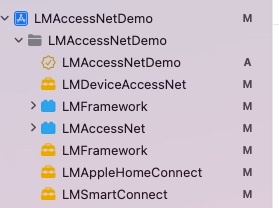
SDK initialization and API description
SDK initialization is unified through LMOpenSDK. See Environment Build for how to obtain each parameter.
Unified initialization
#import <LMFramework/LMFramework.h>

[LMOpenSDK setAppChannel:@"Your AppChannel"];
[LMOpenSDK setAppGroupId:@"Your AppGroupId"];

LMRegionModel *regionModel = [[LMRegionModel alloc] init];
regionModel.appId = @"Your appId";
regionModel.appKey = @"Your appKey";
regionModel.supportDeviceArea = @"Your SupportDeviceArea";
regionModel.serverCode = @"Your ServerCode";
regionModel.countryCode = @"Your CountryCode";
regionModel.server = @"Your Server";
regionModel.coapServer = @"Your CoapServer";
regionModel.staticsResPrefix = @"Your StaticsResPrefix";
regionModel.appImgPrefix = @"Your AppImgPrefix";
[LMOpenSDK setRegionModel:regionModel];

[LMOpenSDK setH5UrlPrefix:@"Your H5UrlPrefix"];
[LMOpenSDK setLanguage:@"zh-Hans"];
[LMOpenSDK setUserId:@"Your UserId" token:@"Your AccessToken"];
LMRegionModel parameter description
| Parameter | Description | Required | Source |
|---|---|---|---|
| appId | Identity ID issued by the open platform | Yes | Aqara Open Platform |
| appKey | Identity Key issued by the open platform | Yes | Aqara Open Platform |
| supportDeviceArea | Device pairing region | Yes | Aqara Open Platform |
| serverCode | Server region code | Yes | Aqara Open Platform |
| countryCode | Country code | Yes | Aqara Open Platform |
| server | Request domain host | Yes | Aqara Open Platform |
| coapServer | Device access server address | Yes | Aqara Open Platform |
| staticsResPrefix | Static resource path | Yes | Aqara Open Platform |
| appImgPrefix | CDN image path for pairing UI | Yes | Aqara Open Platform |
| h5UrlPrefix | H5 resource path within the SDK | No | Aqara Open Platform |
| userId | Current user account ID | Yes | Aqara Open Platform |
| token | Current user account token | Yes | Aqara Open Platform |
The legacy
setServer:appId:appKey:iconBaseUrl:APIs are deprecated. Please usesetRegionModel:for initialization.
Set up languages
| Parameter | Description |
|---|---|
| zh-Hans | Chinese |
| en | English |
| ru | Russian |
| ko | Korean |
| zh-HK | Traditional |
| zh-Hant-TW | Taiwan - Traditional |
Read local resource bundle
[LMDriverConfig sharedInstance].isLocalResource(YES);
Device page navigation (recommended)
Important: Use
LMSDKDeviceRouterfor device page navigation. Directly calling vertical SDK navigation APIs is no longer recommended. See Device Control SDK Usage for details.
After integrating LMSDKDeviceRouter, navigate to the device control home page:
#import <LMSDKDeviceRouter/LMSDKDeviceRouter.h>

[LMSDKDeviceRouter pushToDeviceControlPageWithDevice:device
                                navigationController:self.navigationController
                                            animated:YES
                                          completion:nil];