IOS Device Pairing SDK
This SDK includes the logic part and UI interface of Aqara device network distribution; the iOS version that the SDK depends on cannot be lower than 15.1
Compiler environment: XCode14.0 or above
Language: Object-C
Integrated SDK
1.Environment Build
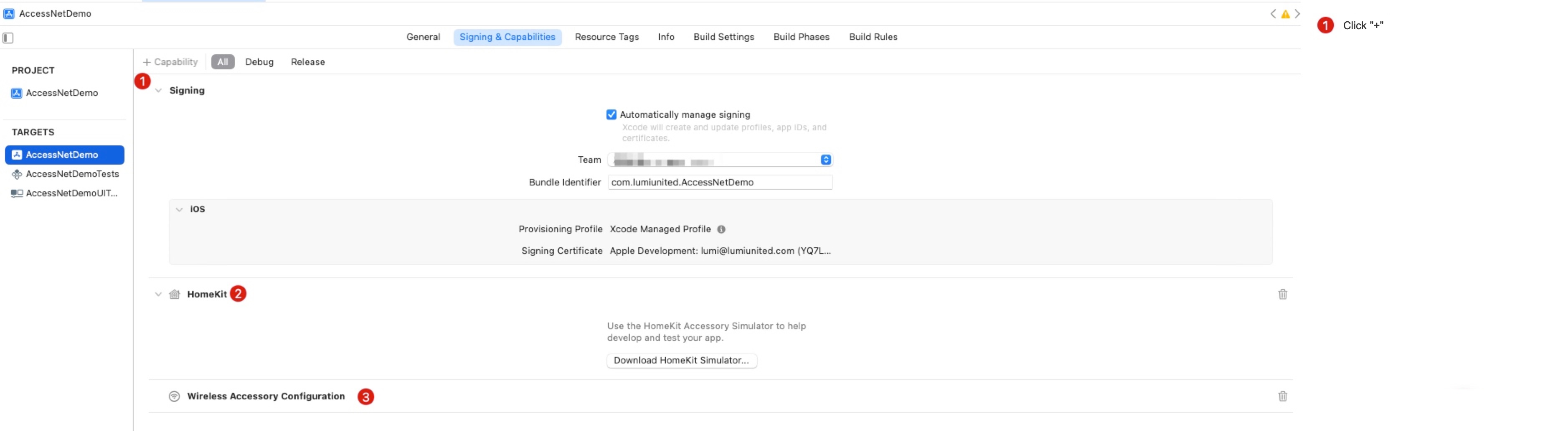
The Device Pairing SDK needs to use the permission functions of HomeKit and Wi-Fi, and the host project needs to add the following Capability:
1. Homeikit
2. Wireless Accessory Configuration
2.Permission Profile
The SDK needs to apply to iOS for the following system permissions:
1.
NSHomeKitUsageDescriptionAccess to HomeKit 2.NSCameraUsageDescriptionCamera access permission (scan the QR code on the device for network configuration) 3.NSLocalNetworkUsageDescriptionLocal network search authority (Device Pairing by LAN) 4.NSLocationWhenInUseUsageDescriptionUse geographic location permission (mobile phone obtains WiFi name, iOS 13 needs to confirm that the App has enabled the location permission. iOS 14 needs to confirm that the App has enabled the precise location permission. If the WiFi name is still not obtained after the above configuration, the developer needs to deal with it separately, such as Manually enter the WiFi name).
NSBluetoothAlwaysUsageDescriptionObtain Bluetooth permission (Device Pairing by Bluetooth)NSBonjourServicesUse the mDNS service to discover Greenmi devices, and set the service name "_aqara._tcp."
You can quickly add the following configuration in the info.plist file of the host project:
<plist version="1.0">
   <key>NSBonjourServices</key>
   <array>
          <string>_aqara._tcp.</string>
   </array>
   <key>NSCameraUsageDescription</key>
   <string>Allows the app to use the camera to add accessories</string>
   <key>NSHomeKitUsageDescription</key>
   <string>Allow this App to control HomeKit-enabled devices</string>
   <key>NSLocalNetworkUsageDescription</key>
   <string>Need to use local network to discover device information on LAN</string>
   <key>NSLocationWhenInUseUsageDescription</key>
   <string>Need your location information to provide better service</string>
   <key>NSBluetoothAlwaysUsageDescription</key>
   <string>Allow this app to use bluetooth connection</string>
</dict>
</plist>
3.Required third-party pod dependencies
The SDK needs to use the following third-party frameworks:
pod 'Masonry'
pod 'TTTAttributedLabel'
pod 'ZBarSDK', '~>1.3.1'
pod 'SDWebImage', '5.3.0'
pod 'YYModel'
pod 'MJRefresh'
pod 'KVOController'
pod 'AFNetworking', '3.2.0'
pod 'SVProgressHUD'
4.Import SDK
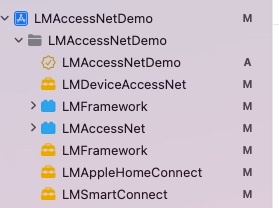
The following SDK needs to be imported in the host project:
LMDeviceAccessNet.frameworkSDK packaged with device pairing UILMSmartConnect.frameworkBluetooth module and AP device pairing logic SDKLMAppleHomeConnect.frameworkHomeKit-related API packaging SDKLMFramework.frameworkBasic SDK, basic configuration of Aqara, macro definition and encapsulation of general logic
Resource:
LMAccessNet.bundlePicture resources related to device pairingLMFramework.bundleAqara multilingual files
SDK initialization
Introduce the header file in the Controller that needs to pull up the Aqara Device Pairing:
#import <LMDeviceAccessNet/LMDeviceAccessNet.h>
#import <LMFramework/LMFramework.h>
Unified initialization
See Environment Build for how to obtain each parameter.
[LMOpenSDK setAppChannel:@"Your AppChannel"];
[LMOpenSDK setAppGroupId:@"Your AppGroupId"];

LMRegionModel *regionModel = [[LMRegionModel alloc] init];
regionModel.appId = @"Your appId";
regionModel.appKey = @"Your appKey";
regionModel.supportDeviceArea = @"Your SupportDeviceArea";
regionModel.serverCode = @"Your ServerCode";
regionModel.countryCode = @"Your CountryCode";
regionModel.server = @"Your Server";
regionModel.coapServer = @"Your CoapServer";
regionModel.staticsResPrefix = @"Your StaticsResPrefix";
regionModel.appImgPrefix = @"Your AppImgPrefix";
[LMOpenSDK setRegionModel:regionModel];

[LMOpenSDK setH5UrlPrefix:@"Your H5UrlPrefix"];
[LMOpenSDK setLanguage:@"zh-Hans"];
[LMOpenSDK setUserId:@"Your UserId" token:@"Your AccessToken"];
The legacy APIs
setServer:appId:appKey:iconBaseUrl:,setCoapServer:, andsetCountryCode:are deprecated. Please usesetRegionModel:for initialization.
Configure pairing user information
- (void)setAccessNetHomeId:(NSString *)homeId;
| Parameter | Description |
|---|---|
| homeId | Home position ID |
Example:
[LMAccessNetUISDK.sharedInstance setAccessNetHomeId:@"real1.103xxxxxx4"];
List of device with Device Pairing
Jump to the Aqara configuration page in the host APP:
[LMAccessNetUISDK.sharedInstance pushSupportedDeviceListPage];
Enter the single-device device pairing process
| Parameter | Description |
|---|---|
| model | The model value of the device (queried from the Aqara open platform) |
| completion | Return controller object/error information |
-(void)presentSingleDeviceAccessNetWithModel:(NSString *)model completion:(void (^)(UIViewController *controller, NSError *error))completion;
Example:
[[LMAccessNetUISDK sharedInstance] presentSingleDeviceAccessNetWithModel:@"lumi.plug.macn01" completion:^(UIViewController * _Nonnull controller, NSError * _Nonnull error) {
    if(controller) {
        LMNavigationController *navi  = [[LMNavigationController alloc] initWithRootViewController:controller];
        navi.modalPresentationStyle = UIModalPresentationFullScreen;
        [self presentViewController:navi animated:YES completion:nil];
    } else {
        [LHTipsUtils showError:error];
    }
}];
How to switch back after successful network distribution:
LMAccessNetUISDK.sharedInstance.accessNetCallBack = ^(id  _Nonnull response, NSError * _Nonnull error) {
    NSLog(@"accessNetCallBack = %@", response);
};